


Accelerate Optimizely DAM Adoption: Unlocking Business Value with Metadata Bulk Import
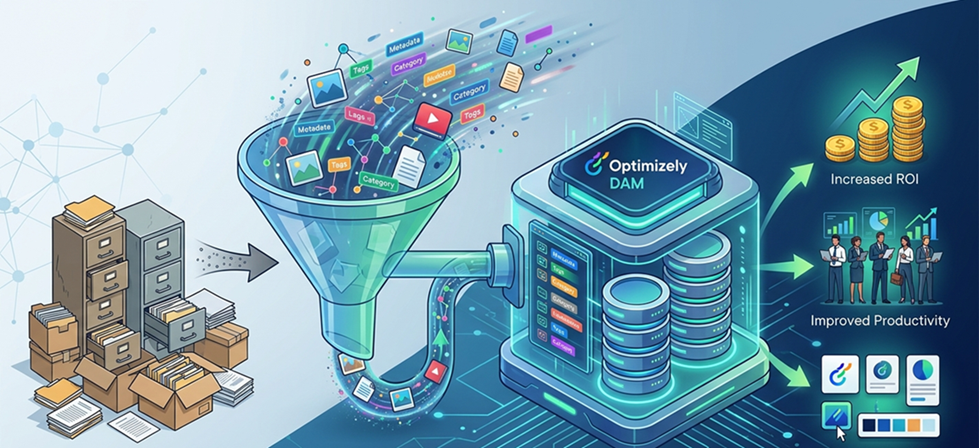
Accelerating Optimizely DAM Adoption
How a Metadata-Driven Bulk Import Utility Unlocks Real Business Value
Executive Summary
For enterprises running Optimizely CMS 12 or 13, Digital Asset Management (DAM) is no longer optional—it is the strategic backbone of content operations. Yet the single biggest obstacle to DAM adoption is not technology; it is the sheer friction of getting thousands of existing assets off shared drives and into a governed, metadata-enriched repository.
The ImportAssetToOptiDam NuGet utility directly eliminates that friction. Built on .NET 8 and integrated with the Optimizely CMP API, it transforms a simple Excel spreadsheet and a folder of images into a fully tagged, SEO-enriched, governance-ready DAM library—automatically, overnight if required.
Why this matters to leadership
Every day, assets sit outside the DAM, your teams duplicate effort, miss SEO opportunities, and expose the business to brand and compliance risk. This utility compresses a weeks-long DAM migration into hours.
The Business Problem: DAM Adoption Stalls at the Front Door
In virtually every Optimizely enterprise engagement, the pattern is the same. The platform is configured, the taxonomy is designed, the workflows are approved—and then momentum halts. Marketing teams are sitting on thousands of product images structured in a spreadsheet, and the only path to get them into the DAM is manual, one-by-one UI uploads.
The downstream cost is substantial:
- Editor productivity consumed by asset housekeeping instead of content creation
- Inconsistent metadata and tags undermining search and personalization engines
- CMS pages pointing to unmanaged file shares, creating governance blind spots
- SEO performance degraded by missing alt-text and uncategorized assets
For a CTO or Senior Architect, this is an integration gap, not a training problem. The solution is a reliable, repeatable, automated ingestion pipeline—exactly what this utility provides.
What the Utility Does: A Five-Step Pipeline
- Read Excel — Parses each row for asset metadata: title, description, alt text, tags, and custom DAM fields
- Match Files — Maps each row to the corresponding image in the local Images folder
- Authenticate — Obtains an OAuth 2.0 token from Optimizely CMP using Client ID and Client Secret
- Upload & Enrich — Pushes the binary to DAM and immediately applies all structured metadata
- Report — Writes an output Excel containing the published DAM URL for every asset
Architectural Value: Why This Is the Right Design
Decoupled Ingestion Architecture
From an enterprise architecture standpoint, the utility enforces a clean separation of concerns that makes it extensible and platform-agnostic. The Excel sheet acts as the control plane, the Images folder is the binary payload, and the Optimizely CMP API is the integration boundary.
Metadata-First: SEO and Governance by Design
Assets are not just uploaded—they arrive in the DAM already enriched. Every image carries structured attributes, alt text, tags, and custom field values defined in the Excel template before a single API call is made.
OAuth 2.0 Security — No Human in the Loop
The utility integrates directly with the Optimizely CMP OAuth 2.0 token endpoint. No user session is required, no browser interaction, no shared credentials. The application authenticates using Client ID and Client Secret, making it suitable for unattended batch execution or CI/CD pipelines.
Getting Started: Five Minutes to First Import
NuGet Package:
https://www.nuget.org/packages/ImportAssetToOptiDam
Version 1.0.0 | Targets .NET 8.0+
Installation Steps:
- Install the package:
dotnet add package ImportAssetToOptiDam --version 1.0.0 - Configure
appsettings.jsonwith CMP BaseUrl, ClientId, and ClientSecret - Place the Excel file in
ExcelSheetfolder and images inImagesfolder, then run the console app
The output Excel (in the Output folder) contains published DAM URLs for all assets—ready for CMS or downstream systems.
ImportAssetToOptiDam is currently in Beta. Validate in DEV and UAT environments before production use. Verify metadata mapping, duplicate handling, and file mismatches against your DAM taxonomy.
Strategic Fit: Where This Accelerates Your Roadmap
- CMS 11 to CMS 12/13 migration — bulk migration with enriched metadata
- DAM onboarding — reduces weeks of manual effort
- Commerce asset refresh — sync seasonal catalogs efficiently
- Partner ingestion — external teams can contribute without CMP UI access
- Headless DXP — generates reusable DAM URLs for any frontend
Closing Perspective
The gap between DAM deployment and actual adoption comes down to ingestion tooling. ImportAssetToOptiDam closes that gap in a way that is architecturally sound, operationally safe, and immediately actionable.
For technology leaders evaluating Optimizely investments, this utility proves that API-first, automation-driven asset management is achievable today—without waiting for roadmap features or external services.
Start your DAM adoption journey today:
https://www.nuget.org/packages/ImportAssetToOptiDam

Comments