
"New" package: Demo Channels for Episerver 11
If you ever worked with the AlloyDemoKit (our demo environment based on the starterkit and available on GitHub), then you might have seen that there are 2 display channels available which are not in the starterkit. These channels are the Text-TV (also known as Teletext) channel and the Apple Watch channel and can be found in the interface by going to the 'Toggle view settings' and then use the 'Select to view in a channel or resolution' button as shown in the image below.
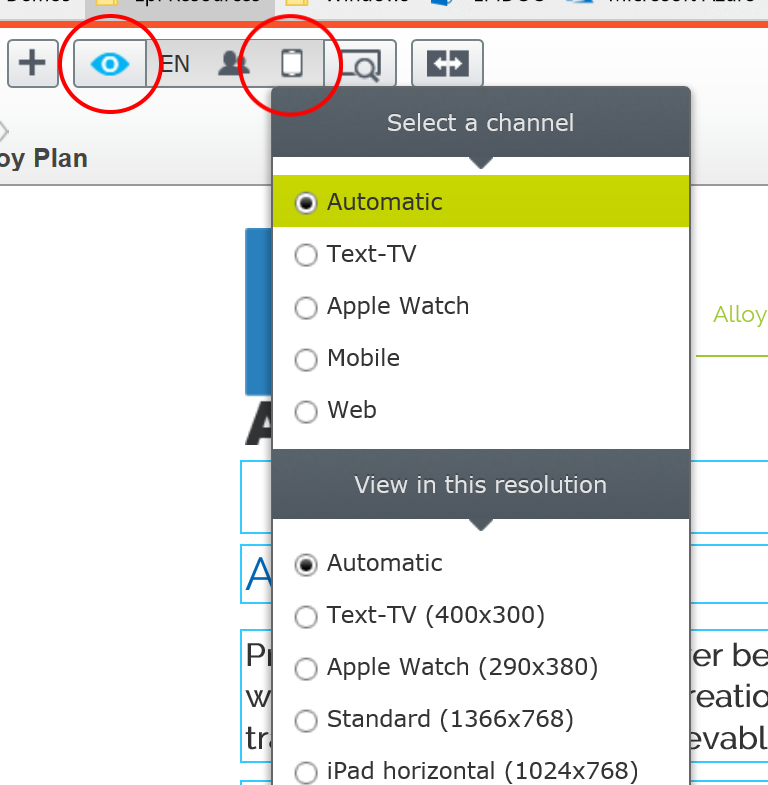
The channels can be added to any Episerver site by using the packages available on the feed. They are both displayed on the feed with the name "Apple Watch Channel" but you can see from the tags which is which.
Although both packages say that there are no dependencies, they will however not work on an Episerver CMS 11 site. This is because of to the moving around of namespaces and the splitting out of the ASP.NET specific code.
I reached out to some members of The EPiCode Community and got hold of parts of the source code for both packages. Combined with the contents from the packages, I was ablo to create a new version that does work on Episerver CMS 11. As the channels are quite similar, I decided to combine them into one package under the Demo Channels monniker. The package is available on the feed and has been given version number 11 to keep up with with major Episerver version numbers. Just install into your solution and the channels will show up in your site after a recompile/restart. No additional configuration needed. Oh, and the source code is of course available from my GitHub account.
Hope this helps.
Comments