
Symbols for EPiServer CMS 6 available
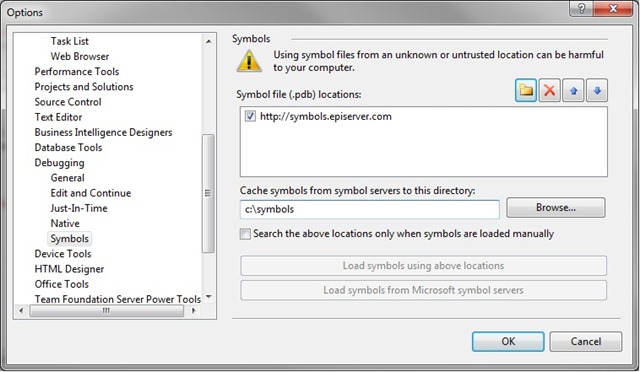
As from yesterday pdb files for EPiServer 6 are available at http://symbols.episerver.com. To configure symbols for debugging in your visual studio follow these steps:
- Open Visual Studio –> tools –> options –> debugging –> symbols
- Click on the folder symbol and add http://symbols.episerver.com
- Add the local folder where pdbs will be cached(ex. c:\symbols)
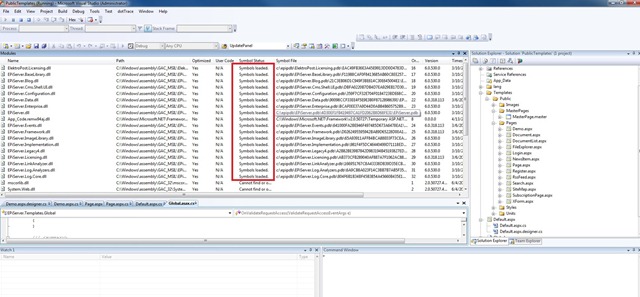
- To check that symbols have been loaded, when debugging, open Debug –> Windows –> Modules and find EPiServer assemblies and check status, it should look as following.
Besides EPiServer CMS 6 you can also find symbols for EPiServer CMS 5 R2, EPiServer CMS 5 R2 SP1 and EPiServer CMS 5 R2 SP2.
You can read more on setting up symbols in this article by Jonas.
Happy programming and of course your feedback is very welcome.
Apr 14, 2010
Great work.
Great! Was just about to ask :). Do you also have the XML files with the documentation for the EPiServer CMS assemblies available?
I get a "403 - Forbidden: Access is denied" when trying to the symbols-url above. Is it not accessible for everyone?
The current symbols are for 6.0.318.113, any chance of getting them updated to 6.0.530.1 please?
Still "403 - Forbidden: Access is denied."
Was this project "forgotten" ?
I'm missing episerver.scheduler.pdb
The symbol link http://symbols.episerver.com
only says ACCESS DENIED ???
Using EPiServer 6 R2, which is giving me a lot of trouble...
and when editing this post, it resaves the post as HTML ?!?!?!?
If this shows how much we can count on EPiServer, I will advice my company to change CMS ASAP... this is hopeless...