A critical vulnerability was discovered in React Server Components (Next.js). Our systems remain protected but we advise to update packages to newest version. Learn More

Per Nergård (MVP)
Sep 24, 2010
  5798
(1 votes)

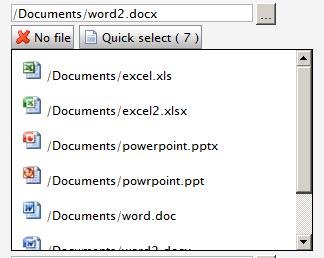
Quick document select property

A custom property for selecting documents. Built on the same base as my “quick image select property”.

I’ve added two buttons to the original property. The first one for removing the selected document and the second displays a vertical scrolling layer displaying a list of all documents in the current selected document folder and below. The number in parentheses is the number of documents found.

Clicking on a image changes the selected image url. The title for each image displays the virtual path.

Not done yet: I’ve not added language handling of the button texts, the quick select button opens up an empty container even if no documents were found.


 

Quickselectorgeneral

quickdocumentsselect

quickdocumentquickselect

You can find the code over at the codesection.

Sep 24, 2010

Comments

Anders Hattestad
Anders Hattestad Sep 24, 2010 09:07 AM

Have to say I like the consept.

Please login to comment.
Latest blogs
Building simple Opal tools for product search and content creation

Optimizely Opal tools make it easy for AI agents to call your APIs – in this post we’ll build a small ASP.NET host that exposes two of them: one fo...

Pär Wissmark | Dec 13, 2025 |

CMS Audiences - check all usage

Sometimes you want to check if an Audience from your CMS (former Visitor Group) has been used by which page(and which version of that page) Then yo...

Tuan Anh Hoang | Dec 12, 2025

Data Imports in Optimizely: Part 2 - Query data efficiently

One of the more time consuming parts of an import is looking up data to update. Naively, it is possible to use the PageCriteriaQueryService to quer...

Matt FitzGerald-Chamberlain | Dec 11, 2025 |

Beginner's Guide for Optimizely Backend Developers

Developing with Optimizely (formerly Episerver) requires more than just technical know‑how. It’s about respecting the editor’s perspective, ensurin...

MilosR | Dec 10, 2025