A critical vulnerability was discovered in React Server Components (Next.js). Our systems remain protected but we advise to update packages to newest version. Learn More

Tahir Naveed
Nov 17, 2016
  5806
(6 votes)

Adding a menu item into Context Menu - EPiServer 10.1 way

A while back, I blogged about how to customise the context menu in EPiServer 7. The code used to extend the context menu was not an approach supported by EPiServer and it was not guaranteed to work with any future releases.

I was looking at the EPiServer documentation and came accross plugin areas document in which EPiServer explains the introduction of "Plug-in areas" for EPiServer 10.1 and higher which can be utilised to customise context menu both for commerce and cms.

The end result will be same and will look like
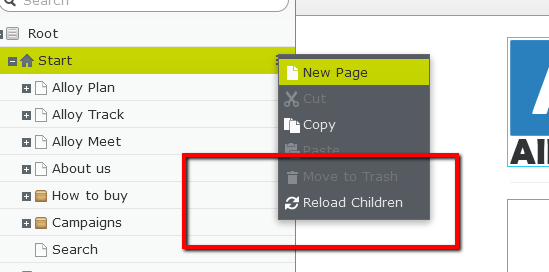
Image Blog_1.png

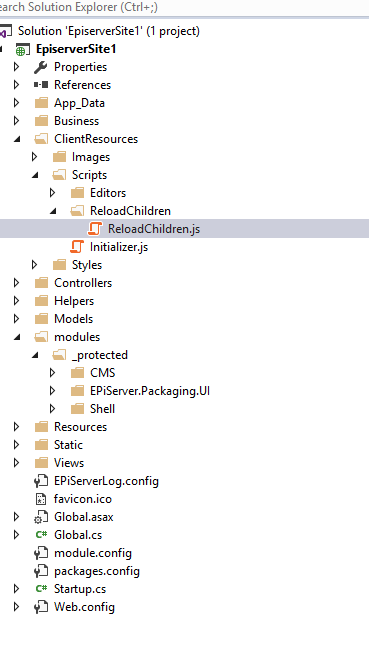
The VS project looks like 

Image VS.png

The gist for the code is here.

Please note that this code will only work for EPiServer.CMS.UI version 10.1 and higher.

It is a very simple code but if you have any questions please feel free to ask.

Nov 17, 2016

Comments

Nov 18, 2016 12:34 PM

Nice post Tahir

Praful Jangid
Praful Jangid May 28, 2025 08:06 AM

This post is still very helpfull. Even with the CMS12. Thanks for sharing it with simplest example.

Please login to comment.
Latest blogs
Looking back at Optimizely in 2025

Explore Optimizely's architectural shift in 2025, which removed coordination cost through a unified execution loop. Learn how agentic Opal AI and...

Andy Blyth | Dec 17, 2025 |

Cleaning Up Content Graph Webhooks in PaaS CMS: Scheduled Job

The Problem Bit of a niche issue, but we are building a headless solution where the presentation layer is hosted on Netlify, when in a regular...

Minesh Shah (Netcel) | Dec 17, 2025

A day in the life of an Optimizely OMVP - OptiGraphExtensions v2.0: Enhanced Search Control with Language Support and Synonym Slots

Supercharge your Optimizely Graph search experience with powerful new features for multilingual sites and fine-grained search tuning. As search...

Graham Carr | Dec 16, 2025

A day in the life of an Optimizely OMVP - Optimizely Opal: Specialized Agents, Workflows, and Tools Explained

The AI landscape in digital experience platforms has shifted dramatically. At Opticon 2025, Optimizely unveiled the next evolution of Optimizely Op...

Graham Carr | Dec 16, 2025