
Create data feeds for EPiServer Forms
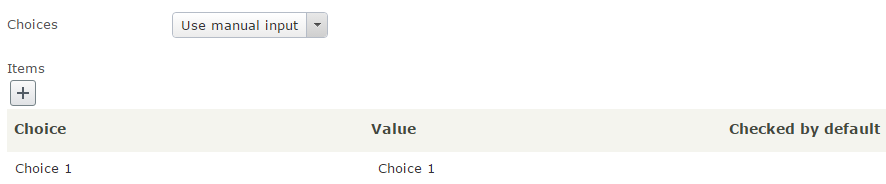
When working with EPiServer.Forms, you may wonder how to bind custom dynamic data source to Selection element instead of manually input items one by one.
You could first do some search and found a great blog here https://www.epinova.no/en/blog/custom-data-feeds-in-episerver.forms/ , but it's been quite out of date since EPiServer.Forms had many updates since then, for example the IExternalSystemFieldMapping interface is no longer existed.
So, I write this blog for any one who comes with the same idea in mind and wants to know how EPiServer.Forms can be extended and works in various scenarios.
1. Create new data feed class
Create new class and implement EPiServer.Forms.Core.Feed.Internal.IFeed and EPiServer.Forms.Core.IUIEntityInEditView.
The IFeed interface has LoadItems method that you can write your own code to get data for selection block.
But to enable displaying the feed on EditView, you need to implement IUIEntityInEditView as well.
    [ServiceConfiguration(ServiceType = typeof(IFeed))]
    public class CustomFeed : IFeed, IUIEntityInEditView
    {
        public IEnumerable<IFeedItem> LoadItems()
        {
            var feedItems = new List<IFeedItem>();

            feedItems.Add(new FeedItem { Key = "Custom data 1", Value = "1" });
            feedItems.Add(new FeedItem { Key = "Custom data 2", Value = "2" });
            feedItems.Add(new FeedItem { Key = "Custom data 3", Value = "3" });

            return feedItems;
        }

        public string ID
        {
            get { return "EDA3BFDF-3EB3-4932-A484-C244FAC55851"; }
        }

        public string Description
        {
            get { return "Custom data source"; }
            set { }
        }

        public string ExtraConfiguration { get; }

        public string EditViewFriendlyTitle
        {
            get { return Description; }
        }

        public bool AvailableInEditView
        {
            get { return true; }
        }
    }
2. Have a feed provider
To know which feed will be displayed, the IFeedProvider must be implemented.
    public class FeedProvider : IFeedProvider
    {
        public IEnumerable<IFeed> GetFeeds()
        {
            return ServiceLocator.Current.GetAllInstances<IFeed>();
        }
    }
3. Build your project and check in EditView
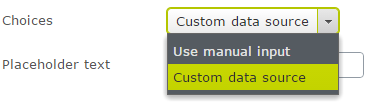
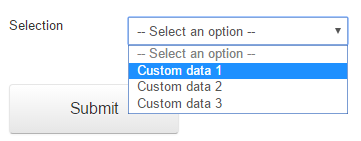
Current EPiServer.Forms used in this blog is v4.4.1

Comments