

Importing Form Submission Data into Optimizely Forms Using DdsPermanentStorage
🔍 The Challenge
During our initial analysis, we discovered that Optimizely Forms does not offer a built-in API to directly insert or update form submissions programmatically. While the method PerformDataSubmit() handles submission automatically through the UI (taking care of cookies and submission IDs), it relies on HttpContext, which we don’t have access to in a scheduled job environment—like in our one-time migration scenario.

✅ The Solution: DdsPermanentStorage
After some investigation, we found that the internal class DdsPermanentStorage can be used to directly interact with the Optimizely Forms' data store. This allowed us to insert and update form submissions programmatically without depending on the httpContext.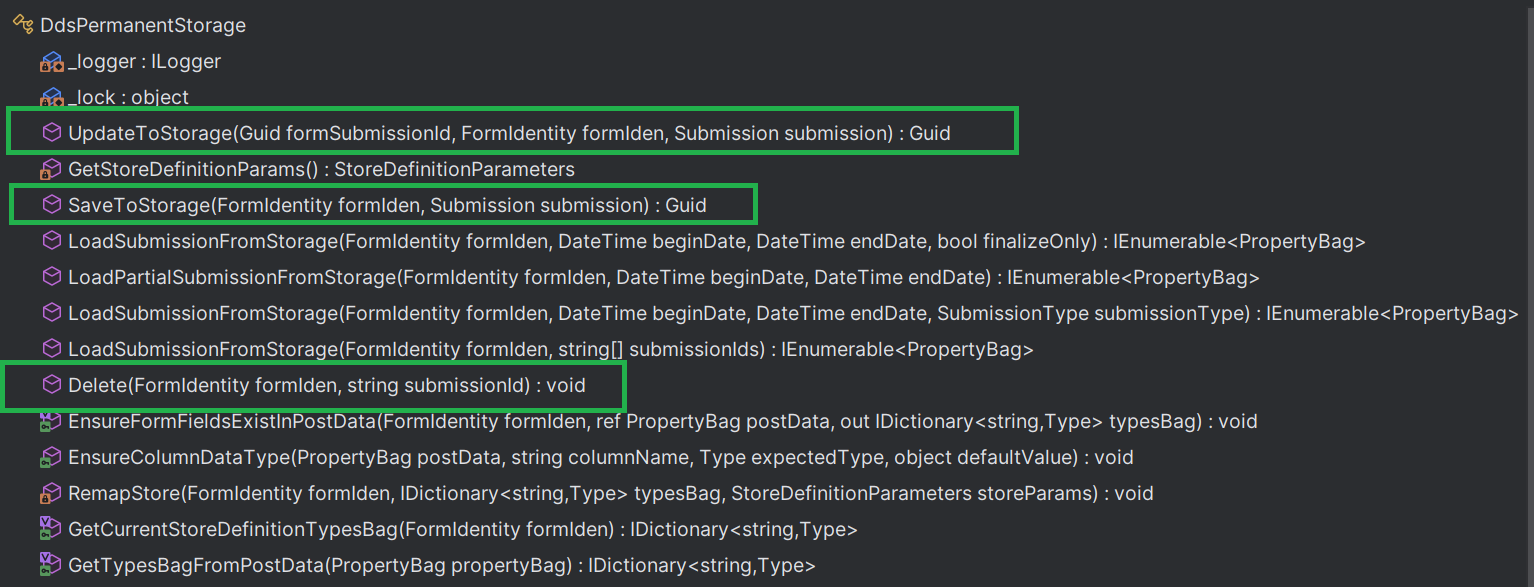
We utilized this class in a scheduled job and were able to import all records successfully.
🔸 Important: To ensure these submissions show up correctly in the Form Submissions view under Edit Mode, you must include the SYSTEMCOLUMN_Language field during creation.

🕒 Handling Custom Submission DateTime
While everything was working well, we noticed that the submission timestamp (Created date) was automatically generated by the system at the time of insertion. However, our source data contained historical submission timestamps, and it was important for reporting and UI display that we preserve these original dates.
To solve this, we went one step further and overridden the default behavior to allow setting a custom submission date. We achieved this by extending DdsPermanentStorage as below.
using EPiServer.Data.Dynamic;
using EPiServer.Forms.Core.Data;
using EPiServer.Forms.Core.Models;

namespace Alloy.Customization.ExtendedDdsPermanentStorage;

public class ExtendedDdsPermanentStorage : DdsPermanentStorage
{
    public const string SYSTEMCOLUMN_SubmitTime = "SYSTEMCOLUMN_SubmitTime";
    protected override void EnsureFormFieldsExistInPostData (FormIdentity formIden, ref PropertyBag postData, out IDictionary<string, Type> typesBag)
    {
        DateTime.TryParse(Convert.ToString(postData[SYSTEMCOLUMN_SubmitTime]), out DateTime submitedTime);
        base.EnsureFormFieldsExistInPostData(formIden, ref postData, out typesBag);
        if (submitedTime > DateTime.MinValue)
        {
           postData[SYSTEMCOLUMN_SubmitTime] = submitedTime;
        }
    }
}
🧩 Dependency Injection Setup
Since this custom class may need to be reused in other parts of the solution (or injected), don’t forget to register it in the DI container if you're wrapping it inside a service or using Optimizely’s built-in services.
Hope this post helps someone facing the same challenge!
Comments