


Disallow duplicate items in the Episerver ContentArea Property
Hey guys,
In the past, I learned about the validation attributes and to try it out I have created a validation attribute for disabling the duplicate items(page/block/media) in the ContentArea property. Yesterday some of my colleagues asked me about this so thought to write this post.
So, first of all, I have created a class called “DisallowDuplicatesAttribute” and written the below code
using EPiServer.Core;
using EPiServer.DataAbstraction;
using EPiServer.Framework.Localization;
using System;
using System.Collections.Generic;
using System.ComponentModel.DataAnnotations;
using System.Linq;
using System.Web;

namespace Test.Infrastructure.Cms.Models.Attributes
{
    [AttributeUsage(AttributeTargets.Property)]
    public sealed class DisallowDuplicatesAttribute : ValidationAttribute
    {
        protected override ValidationResult IsValid(object value, ValidationContext validationContext)
        {
            var propertyDefinitionRepository = EPiServer.ServiceLocation.ServiceLocator.Current.GetInstance<IPropertyDefinitionRepository>();
            var propertyDefinitionId = ((PageData)validationContext.ObjectInstance).Property[validationContext.MemberName].PropertyDefinitionID;
            var propertyDefinition = propertyDefinitionRepository.Load(propertyDefinitionId);
            propertyDefinition.LocalizationService = LocalizationService.Current;

            if (HasDuplicateItems(value as ContentArea))
            {
                return new ValidationResult(string.Format("Duplicate items are not allowed in {0} Property",
                    new object[] {validationContext.MemberName}));
            }

            return ValidationResult.Success;
        }

        bool HasDuplicateItems(ContentArea contentArea)
        {
            if (contentArea == null || contentArea.IsEmpty)
                return false;
            var contentAreaItems = contentArea.Items;
            if (contentAreaItems == null || !contentAreaItems.Any())
                return false;

            List<int> items = new List<int>();

            foreach (var contentAreaItem in contentAreaItems)
            {
                if (items.Contains(contentAreaItem.ContentLink.ID))
                    return true;

                items.Add(contentAreaItem.ContentLink.ID);
            }

            return false;
        }
    }
}
Now created a new PageType called “TestPage” and applied the newly created attribute on the PageContent contentArea property.
[ContentType(DisplayName = "Test Page", GUID = "133523e4-4da1-49e9-a49d-94a9c9b1d413", Description = "Test Page")]
    public class TestPage: BaseFeedPage
    {
        [DisallowDuplicates]
        [CultureSpecific]
        [Display(
            Name = "PageContent",
            Description = "The page content will be used to show page content",
            GroupName = ApplicationConstants.PropertyGroupNames.Content,
            Order = 100)]
        public virtual ContentArea PageContent { get; set; }
    }
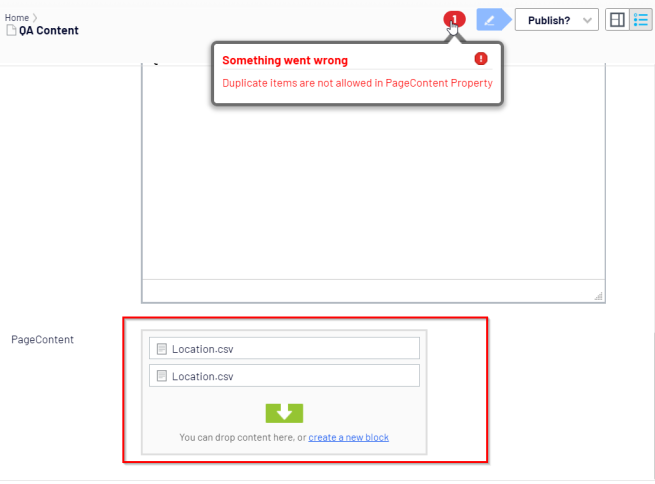
Now if you login into Episerver and then try to drag and drop the same item twice then it will not allow you to publish the page as well as it will give you an error and allow you to publish the page.
Thanks.
Ravindra
Jul 22, 2019
Hi Ravindra,
It's a very nice post. Thanks for that. I have question or you can say kind of suggesion. In your function HasDuplicateItems(), what is the use of adding items into list items? Where are you using those?
Hey Praful,
I am using that list to comparing it with other items in the ContentArea.
Thanks
Ravindra
Make sense, thanks.
Or, You can simply replace the whole
HasDuplicateItems()function with following code linesThanks and regards,
~ Praful Jangid
Yes, We can. It's just a matter of code refactoring.