


Reducing Web Experimentation MAU Using the REST API
Overview
Optimizely Web Experimentation counts an MAU based upon the script snippet rendering for evauluation of web experiement. Therefore when you globally install a snippet in a website you can be counting MAUs with pages that don't need to be counted. There could also be some page types that don't need web ex as there will never be an experiement on it. See https://support.optimizely.com/hc/en-us/articles/4410284235789-Monitor-monthly-active-users-MAUs for imformation around this consumption.
It's suggested in the article to not render the script or opt out using the following script
<script>
  window["optimizely"] = window["optimizely"] || [];
  window["optimizely"].push({
   "type": "optOut",
   "isOptOut": true
  });
</script>
<script src=”https://cdn.optimizely.com/js/{project_id].js”></script>
However how do we know!
I'm Scott Reed, a solution architect at Niteco https://niteco.com/. In this blog post, I'll set out a POC I've created to test resolving this decision.
Solution
The REST API for web experimentation can return active experiments for a specific project using a user bearer token https://docs.developers.optimizely.com/web-experimentation/reference/list_experiments
Therefore it's possible for us to plug in logic to know if a domain/subpage has an active experiment.
As a proof of concept (I have not used in a real project yet) I have created https://github.com/scottreed/Optimizely-Web-Experimentation-Evaluator/
This project is a POC around evaulating Optimizely Web Experimentation via the REST API using the bearer token for a web experimentaion user.
Web experimentation Counts its monthly active users based upon a script being just rendered into the page to evaluate if an experiment needs to be run. This means that whenever you render a web experimentation snippet, even if there is no need to run it, it will evaluate and for an unique user count as an MAU.
This can increase costs as you're counting users that don't need to run this is especially important with multi-site where you might not be running experiments on specific sections of pages or subsites.
Project Overview
This is a standard project with the following
- .NET 8.0
- ASP.NET Core 8.0
- Optimizely SDK
- Minimal API
- In Memory Cache
Features
The project has the following features
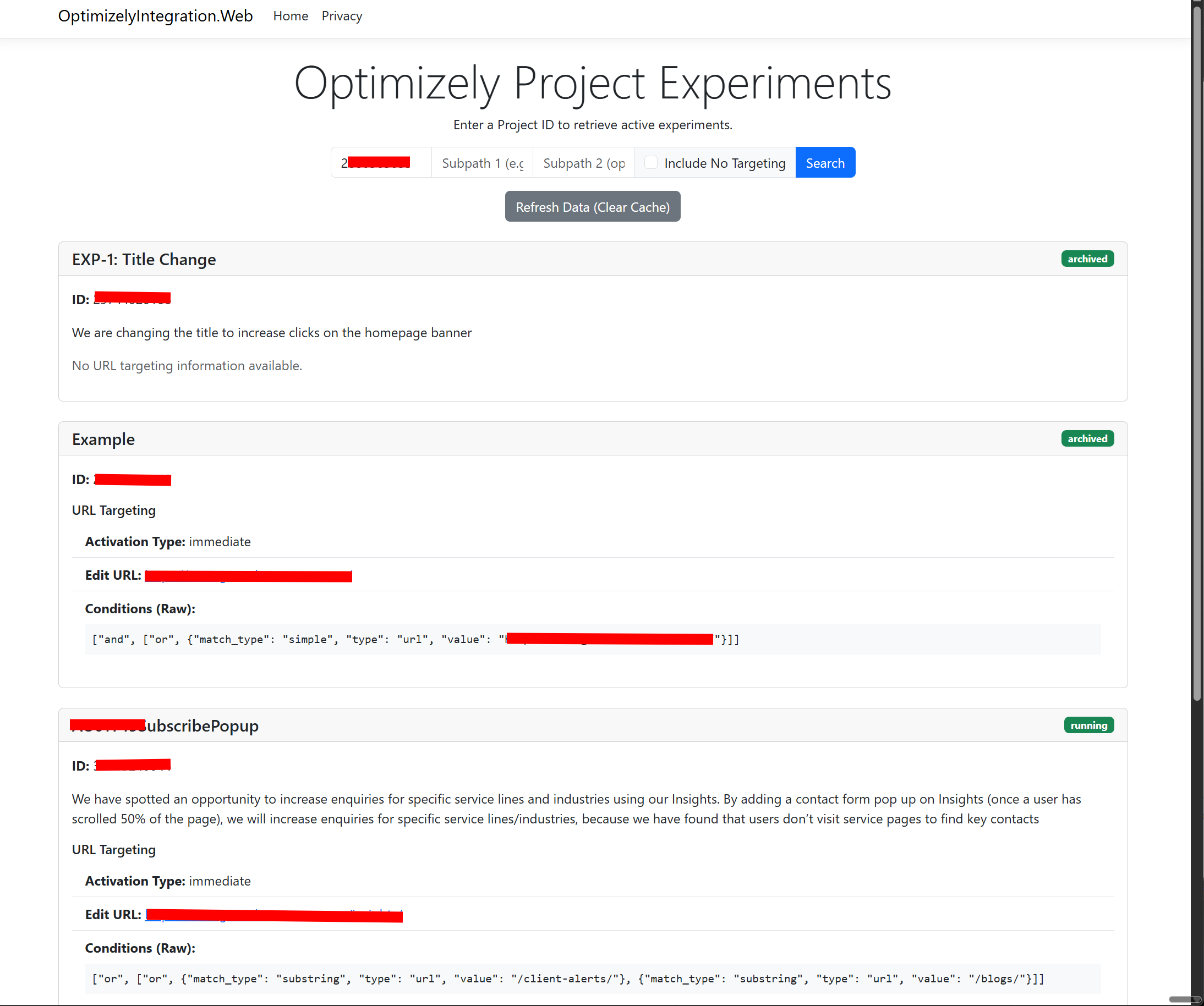
- Return a list of experiments from the web experimentation REST API based upon the past in status flags.
- Filtering the list of experiments based upon multiple path criteria (e.g., a sub-path or the route of the website).
- A Boolean in the
ExperimentFilterServiceservice to allow returning experiments if they have no URL matching criteria. - In-memory caching of experiments so they don't need to be constantly re-evaluated with a 15-minute window.
- A minimal API that matches the webhook JSON Post format. This webhook can be configured in the settings for a project and notifies you when a project has a change. This minimal API will clear the cache based upon the project ID.
Conclusion
Using this we can actively know from backend code if we need not render (or opt) the web experiementation script. This way we can specifically stop MAU counting and reduce cost to ONLY what's needed!
To note this is just the evaulator so if you need to override this and still render (for tracking / audience criteria or other features) you can adapt this.
As this is just a POC and a thought idea let me know if you have an concer
It’s always helpful to have a simple starter app that demonstrates how to use an API and makes it easy to try things out. Nice work!
Thanks Andreas, yeah this POC should help an issue my client is facing but thought it was an idea worth throwing out for people to play with.
To summarize this approach. You are saying we could pass in the current page Url and determine if the Experiment script should be on the page. Is that correct?
That's really cool because I had to move the script to Google Tag Manager and create a bunch of triggers to only fire when a Url matched. Thanks for sharing.
FYI:
based upon the past in status flags = based upon the passed in status flags
Yes, Mike, although to clarify, this is specifically to check if there are any running experiments on the current URL. This will match any experiments that are running for all pages, as well as any ones that are targeting this specific sub path.
Scott, this is an incredible solution. Genuinely impressive. I can immediately think of at least three examples where this could reduce MAU consumption by 70-80%. For some subscription tiers, it may not really even be an issue, like where limits are more or less matched to total website traffic. However, for companies operating on lower MAU allowances, this is an absolute lifesaver.
Awesome thinking, this could make a huge difference to some!!!